MAXDATA SR1202 M1 User's Guide Page 60
- Page / 152
- Table of contents
- TROUBLESHOOTING
- BOOKMARKS

- StorView 1
- RAID User Guide 1
- MAXDATA SR1202 M1 1
- 2 Contents 2
- Contents 3
- 8 SAN LUN Mapping 63 4
- MAXDATA SR1202 M1 – StorView 5
- 6 Contents 6
- 1 Preface 9
- 10 Preface 10
- 2 Introduction 11
- License Manager 12
- 3 StorView Quick Tour 13
- Enclosure Section 14
- Locate Enclosure 17
- Mixed Drive Types 18
- Server Sidebar Section 21
- How to Use this Document 23
- 4 Embedded StorView Setup 25
- Using Dynamic IP (DHCP) 26
- Using Static IP 26
- Getting a New IP Address 26
- 5 Getting Started 27
- 28 Getting Started 28
- Configuring E-MAIL Notices 29
- Deleting an E-MAIL Addressee 30
- Configuring SNMP Traps 31
- Changing the Password 32
- Monitoring Setting 33
- Additional Monitoring Servers 34
- 6 Storage Assistant 35
- 36 Storage Assistant 36
- 38 Storage Assistant 38
- 40 Storage Assistant 40
- Creating Disk Arrays 43
- Create the Array 45
- Initializing the Array 49
- Adding Hot Spare Drives 51
- Assigning a Global Spare 52
- Figure 32. Drive Panel Screen 53
- Figure 33. Make Spare Screen 53
- Assigning a Dedicated Spare 54
- Removing a Spare 55
- Auto Spare 55
- Create the Logical Drive 56
- Figure 38. Main Screen 57
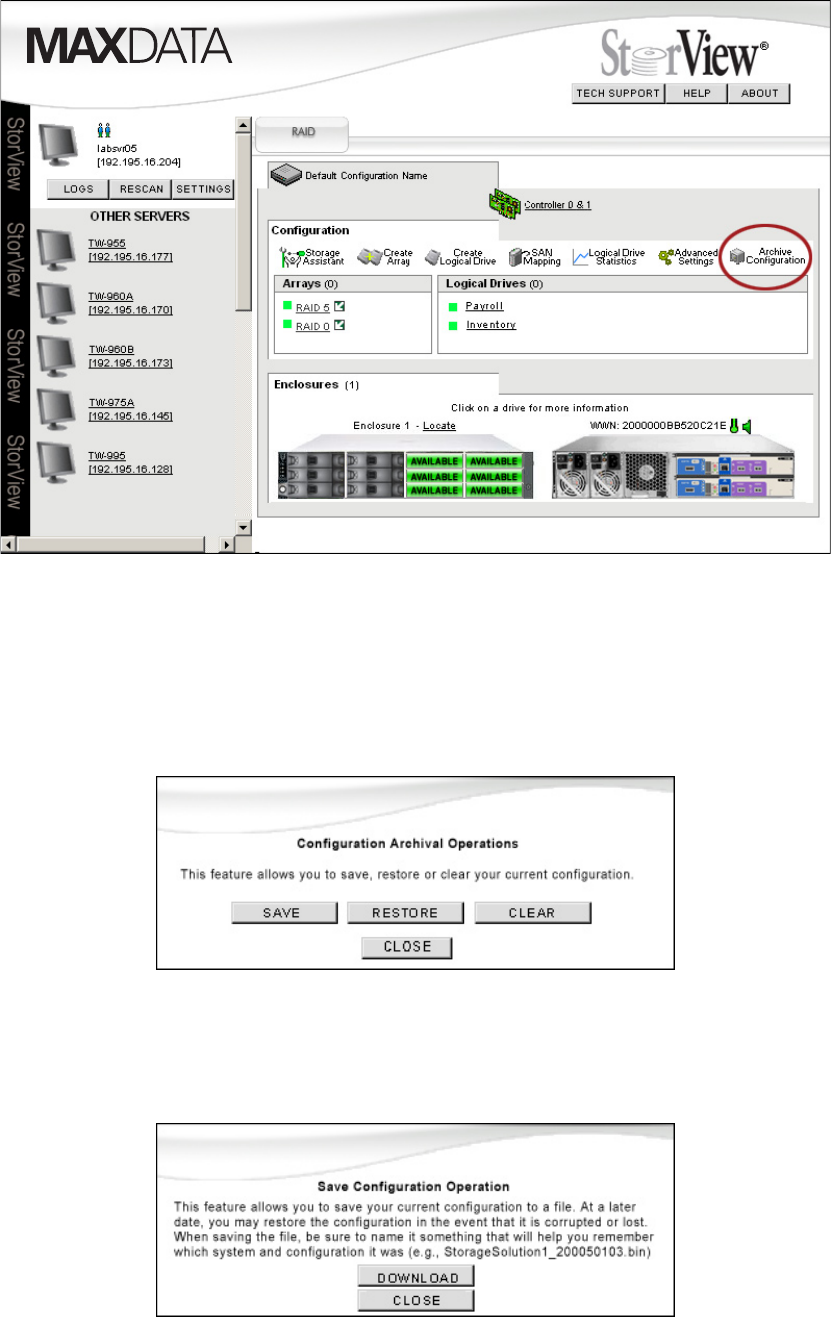
- Saving the Configuration 59
- Figure 45. File Name Screen 61
- 8 SAN LUN Mapping 63
- 64 SAN LUN Mapping 64
- Creating a SAN LUN Mapping 65
- 66 SAN LUN Mapping 66
- Figure 48. Main Screen 66
- Deleting a SAN LUN Mapping 68
- Modifying a SAN LUN Mapping 68
- 70 SAN LUN Mapping 70
- 9 Controller Environmentals 71
- Operations 72
- Update Controller Firmware 73
- 74 Controller Environmentals 74
- Overview 75
- Advanced Settings 75
- Identity 76
- Fault Tolerance 77
- Host Ports 79
- Advanced Array Functions 81
- Modifying Arrays 82
- Verify Parity 83
- Identifying Drive Members 85
- Rebuilding an Array 86
- Figure 69. Drive Panel Screen 87
- Expanding an Array 88
- Trust an Array 89
- Restoring the Configuration 91
- Clearing the Configuration 93
- Advanced Drive Options 94
- Locate Drive 95
- Viewing Unassigned Free Space 96
- Expanding a Logical Drive 96
- Figure 85. Main Screen 97
- Deleting a Logical Drive 98
- Execution Throttle 101
- Scatter/Gather 101
- Additional StorView Functions 102
- Take Control Monitoring 103
- 13 Support and Updates 105
- 106 Support and Updates 106
- Caution 107
- 14 Event Logs 109
- 110 Event Logs 110
- Figure 97. Main Screen 110
- Figure 98. Event Log Screen 111
- 112 Event Logs 112
- Figure 100. Main Screen 113
- Figure 101. Event Log Screen 113
- 114 Event Logs 114
- Figure 104. Main Screen 115
- Figure 105. Event Log Screen 115
- Operating System Event Log 116
- List of Events 116
- Drive and Array Events 120
- Controller Port Events 125
- Enclosure Events 127
- NOTE 130
- Failed Drives Codes 133
- 15 Statistics 135
- Read-Ahead Statistics 138
- Command Cluster Statistics 139
- Introduction 141
- Sequential Access 142
- Access Size 142
- RAID 5 Sub-Array 143
- Multiple Drive Failures 143
- 17 Troubleshooting 145
- 150 Index 150
- 152 Index 152
Related products and manuals for Servers MAXDATA SR1202 M1
 (23 pages)
(3 pages)
(23 pages)
(3 pages)

 (159 pages)
 (17 pages) (21 pages)
 (77 pages) (6 pages)
© 2020, manymanuals.com. All rights reserved. | 0.035 s |
 Manymanuals.com
 Manymanuals.de
 Manymanuals.fr
 Manymanuals.it
 Manymanuals.pl
 Manymanuals.cz
 Manymanuals.es
 Manymanuals-pt.com
Comments to this Manuals